
Maryland Vaccines For Children Program
RESPONDING TO A TEMPERATURE EXCURSION
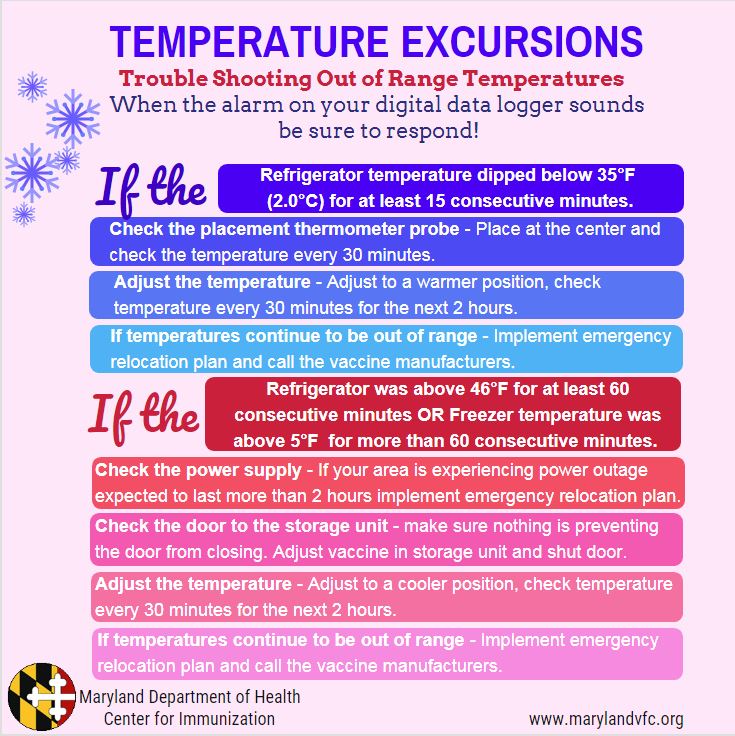
If your digital data logger has been going off for more than an hour please contact the vaccine manufacturer for all of the vaccines in your storage unit. Be prepared to implement your office’s vaccine management plan. Be sure to submit a Temperature Excursion Report.
TEMPERATURE EXCURSIONS
Definitions: Three Levels of Temperature Excursions (“TEs”)
Temperature Excursion: Any time the temperature in a refrigerator unit is outside 36° through 46°F (2.0°C through 8.0°C) or the temperature in a freezer unit is above 5°F (-15°C).
Level 1: Non-Reportable Temperature Excursion: An unavoidable brief time outside the routine recommended ranges that does not necessitate further inquiry. These are often readily explainable (loading or counting inventory, brief defrost cycle, short power outage or door left ajar for 20 minutes or less).
Non-Reportable Temperature Excursion Procedure
- Clear the alarm on the digital data logger (review your DDL’s user manual or call the DDL manufacturer)
- Initial and record time on the temperature log and indicate a new alarm was noted
- Write “non-reportable” on the temperature log that was reviewed to evaluate alarm
- File the data logger report with the other temperature logs for that unit and maintain for three years.
- No further action necessary.
Level 2: Reportable Temperature Excursion: A TE that could possibly compromise vaccine and should FIRST be reported to the vaccine manufacturer.
Is this a reportable temperature excursion? Yes, if it meets any one of the five criteria below:
- Refrigerator temperature dipped below 36°F (2.0°C) for 15 consecutive minutes (or longer) and no progress has been made by adjusting the temperature in the storage unit.
- Freezing temperatures below 32°F (0°C) quickly damage vaccine. Quick intervention may be necessary to save vaccine if temperature begins to get too cold.
- Refrigerator was above 70°F (21°C) for any length of time.
- Refrigerator was above 46°F (8.0°C) for at least 60 consecutive minutes and no progress has been made by adjusting the temperature in the storage unit.
- Freezer temperature above 5°F (-15°C) (5°F) for more than 60 consecutive minutes and no progress has been made by adjusting the temperature in the storage unit.
- Routine defrost cycles may go about 5°F (-15°C) for less than 60 minutes. There is vaccine stability data to support these types of excursions.
- TE is part of a pattern of frequent excursions, regardless of duration.
- You are concerned about TE even though it does not meet above criteria.
Reportable Temperature Excursion Procedures
Vaccine should be quarantined immediately with a “Do Not Use” sign and kept in the storage unit.
- Call the manufacturers for all of the vaccine that is stored in the vaccine storage unit that is in question. You will need to obtain a manufacturer’s vaccine viability report.
- The vaccine manufacturer will need information from your DDL in order to provide specific guidance for the vaccines in your storage unit. The VFC Program will require you to submit this vaccine specific viability report. This means, your DDL must be on and working!
- Download temperature log from digital data logger or document temperatures for the time frame when the TE may have occurred.
- Record the current temperature reading on temperature log.
- Note how long the temperature was out of range.
- Note the minimum and maximum temperatures.
Report “Level 2” temperature excursions to the Maryland VFC Program by calling the VFC Contact Center. Then submit a Temperature Excursion Report on the Maryland VFC website.
Level 3: Actionable Temperature Excursion: TEs that require actions: including waste of certain affected vaccines, transfer of vaccines to back-up storage unit, replacement or repair of storage unit. Not all reportable TEs end up requiring action.
Actionable Temperature Excursion Procedures
I. If TE is still occurring after action has been taken to address the ongoing alarm take the following steps to restore proper storage conditions:
- Quarantine vaccine; label “Do Not Use” and keep in the storage unit.
- Check to see if the storage unit is unplugged.
- Check to see if the storage unit door is open and is sealed adequately.
- Check the thermostat setting.
- Check location of the probe; should be in the middle of the unit with the vaccine.
- Check the coils and vents for dust.
***If storage unit cannot be restored to proper working condition.
- Call the manufacturers for all of the vaccine that is stored in the vaccine storage unit that is in question. You will need to obtain a manufacturer’s vaccine viability report.
- The vaccine manufacturer will need information from your DDL in order to provide specific guidance for the vaccines in your storage unit. The VFC Program will require you to submit this vaccine specific viability report. This means, your DDL must be on and working!
- Transfer vaccine to the designated back up location, listed in your Vaccine Management Plan posted on or beside the storage unit.
- Download temperature log from digital data logger or document the following:
- Current temperature reading on temperature log.
- Note how long the temperature was out of range.
- Note the minimum and maximum temperatures.
Report “Level 3” temperature excursions to the Maryland VFC Program by calling the VFC Contact Center. Then by submit a Temperature Excursion Report on the Maryland VFC website.
II. If the DDL alarm has been triggered because your office is experiencing a power outage, contact your local utility company. If restoration is expected within four hours, do not move vaccine. Keep the door closed and monitor your vaccine temperatures. This brief TE may be less harmful that transporting vaccines. If power outage is going to last more than four hours, follow your Vaccine Management Plan.
Reporting Temperature Excursion After Business Hours, Weekends and Holidays:
- Quarantine vaccine; label “Do Not Use”.
- Download data logger report and review.
- Check to see if the storage unit is unplugged.
- Check to see if the storage unit door is open and is sealed adequately.
- Check the thermostat setting.
- Check location of the probe; should be in the middle of the unit with the vaccine.
- Check the coils and vents for dust.
- Contact vaccine manufacturer for all of the vaccines in your storage unit for evaluation of vaccine before using.
- Call the manufacturers for all of the vaccine that is stored in the vaccine storage unit that is in question. You will need to obtain a manufacturer’s vaccine viability report.
- Follow your Vaccine Management Plan.
If storage unit is not currently in range and the problem is such that it cannot be reliably and promptly returned to proper temperatures, consider transferring vaccine to the designated back up location listed in your Vaccine Management Plan.